
Threat Hunting Case Study: Investigating Tor Browser Activity

Table Of Content
- 🔍 Threat Hunting Case Study: Investigating Tor Browser Activity
- 🧠 Why This Matters
- 🔎 Detection: Where It Started
- 🛠️ Investigation Approach
- 📁 File & Process Activity
- 🌐 Network Activity
- 🕒 Timeline Reconstruction
- ⚠️ Risk Assessment
- 🛡️ Recommended Actions
- Immediate
- Long-Term
- 🧠 Key Takeaways
- 📥 Download the Executive Summary Report
- 🚀 Final Thoughts
🔍 Threat Hunting Case Study: Investigating Tor Browser Activity
In this case study, I walk through an end-to-end threat hunting investigation involving Tor Browser activity identified on an endpoint.
This project was conducted as part of my Cyber Range training, focusing on SIEM-based investigation, incident response, and risk assessment.
🧠 Why This Matters
Tor is not inherently malicious - but in enterprise environments, it introduces risks:
- ❗ anonymized communications
- ❗ potential data exfiltration
- ❗ bypass of monitoring controls
This makes it a strong candidate for proactive threat hunting.
🔎 Detection: Where It Started
The investigation began with a threat hunting query in Microsoft Defender for Endpoint.
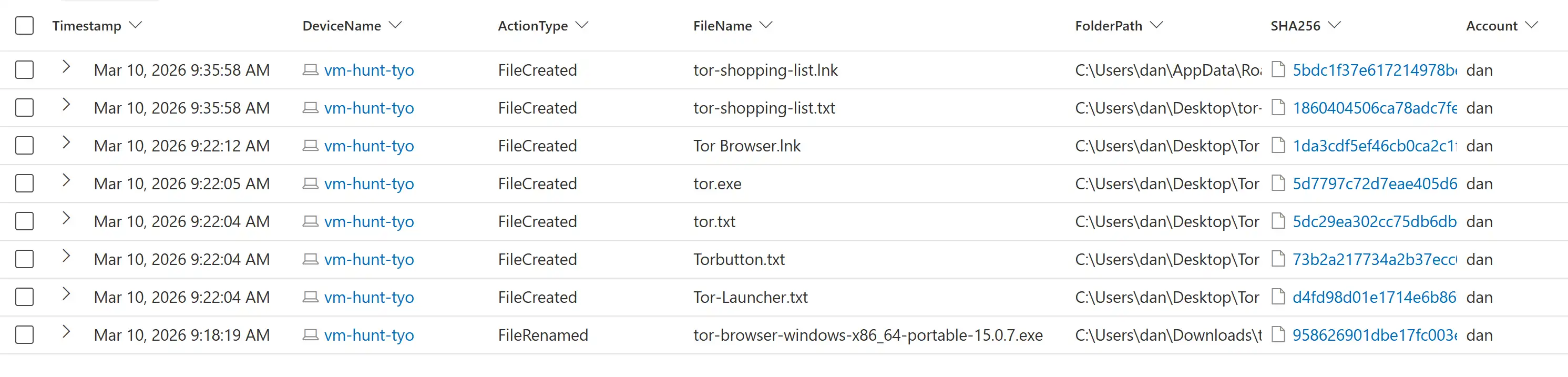
Initial query results highlighting suspicious process and network activity.
At this stage, the goal was to identify any indicators of non-standard or risky behavior.
🛠️ Investigation Approach
I followed a structured workflow:
1️⃣ Identify suspicious indicators
2️⃣ Analyze file activity
3️⃣ Review process execution
4️⃣ Investigate network connections
5️⃣ Reconstruct timeline
6️⃣ Assess risk and recommend actions
📁 File & Process Activity
The investigation confirmed the presence and execution of Tor-related binaries.

Execution of
tor.exe, confirming active use of anonymization software.
This step is critical because it moves from potential indicator → confirmed execution.
🌐 Network Activity
The most important signal came from outbound connections.

Outbound traffic over port 9001, consistent with Tor relay communication.
This confirms:
👉 The system was actively communicating with the Tor network.
🕒 Timeline Reconstruction
To better understand the sequence, I reconstructed the activity timeline.
| Stage | Event |
|---|---|
| T0 | Tor downloaded |
| T1 | Installation completed |
| T2 | tor.exe executed |
| T3 | Tor network connection established |
| Time (UTC) | Event |
|---|---|
| 00:18:19 | Tor installer downloaded |
| 00:21:44 | Tor installer executed |
| 00:22:04–00:22:12 | Tor files extracted to Desktop |
| 00:22:22 | Tor Browser launched |
| 00:22:34 | Connection established to Tor relay |
| 00:22:37–00:27:54 | Continued Tor browsing activity |
| 00:35:58 | tor-shopping-list.txt created |
⚠️ Risk Assessment
While no direct malicious payload was identified, the following risks were present:
- 🔐 Potential data exfiltration via anonymized channels
- 🚫 Violation of acceptable use policies
- 👁️ Reduced visibility for security monitoring
👉 Overall Risk Rating: Medium
🛡️ Recommended Actions
Immediate
- Isolate affected host
- Remove Tor software
- Review user activity
Long-Term
- Implement application whitelisting
- Block Tor traffic at network level
- Strengthen endpoint monitoring
🧠 Key Takeaways
💡 Threat hunting helps uncover risks that alerts may miss
💡 SIEM visibility is critical for correlating activity
💡 Clear documentation is essential for incident response
📥 Download the Executive Summary Report
👉 Tor Incident Case Report (PDF)
🔗 Full report and supporting files available on GitHub
🚀 Final Thoughts
This project reflects how security investigations extend beyond detection - they require analysis, context, and risk-based decision-making.
As I continue developing my cybersecurity skills, I aim to bridge:
👉 security operations + risk governance
⚠️ Disclaimer: This project is a simulated threat hunting exercise created for educational and portfolio purposes. The environment, devices, and user accounts referenced are part of a controlled lab environment and do not represent real-world systems or individuals.
Thanks for reading! 🙏
If you're interested in security governance, GRC frameworks, or enterprise risk programs - feel free to connect with me on LinkedIn.
Feel free to reach out with questions or thoughts.