
Threat Hunting with Microsoft Defender XDR (including Defender for Endpoint): Investigating Tor Browser Activity

Table Of Content
- 🔎 Threat Hunting with Microsoft Defender XDR: Investigating Tor Browser Activity
- 🎯 Investigation Overview
- 🚨 Alert Triage
- Key Questions
- Findings
- Severity Assessment
- Investigation Objective
- 🧠 Why Tor Activity Matters
- 🔍 Threat Hunting Methodology
- ⏱ Timeline of Events
- 📥 Step 1: Identifying Tor Downloads
- ⚙️ Step 2: Detecting Installer Execution
- 🚀 Step 3: Detecting Tor Process Activity
- 🌐 Step 4: Detecting Tor Network Connections
- 📄 Step 5: Identifying User Artifacts
- 🚨 Indicators of Interest
- 🧬 MITRE ATT&CK Mapping
- 🛡 Security Assessment
- 🔧 Recommended Security Controls
- ⬆️ Escalation Consideration
- 🧾 Conclusion
- 📥 Download the Executive Summary Report
🔎 Threat Hunting with Microsoft Defender XDR: Investigating Tor Browser Activity
Threat hunting is one of the most valuable skills for a security analyst. Rather than waiting for alerts, analysts proactively search for suspicious activity hidden in telemetry data.
In this project, I conducted a threat hunt using Microsoft Defender XDR Advanced Hunting to investigate suspicious activity related to the Tor Browser on an endpoint.
The investigation confirmed that Tor was downloaded, executed, and actively used on the endpoint, with network connections established to Tor relay infrastructure.
This investigation follows a structured SOC-style workflow including detection, alert triage, timeline reconstruction, severity assessment, and escalation decision-making.
🎯 Investigation Overview
| Field | Value |
|---|---|
| Investigation Type | Threat Hunt |
| Platform | Microsoft Defender XDR |
| Endpoint | vm-hunt-tyo |
| User | dan |
| Detection Method | KQL Log Analysis |
🚨 Alert Triage
Upon identifying Tor-related activity, the alert was triaged to determine whether it represented malicious behavior, policy violation, or benign user activity.
Key Questions
- Is the activity authorized within the environment?
- Is there evidence of malicious intent or follow-on activity?
- Does the activity indicate data exfiltration or lateral movement?
Findings
- Tor Browser activity confirmed via file, process, and network telemetry
- No evidence of privilege escalation or persistence
- Network connections aligned with Tor relay infrastructure
Severity Assessment
The activity was classified as Medium severity due to:
- Use of anonymization software in a monitored environment
- External encrypted communication
- Potential violation of enterprise security policy
Investigation Objective
Identify whether the Tor Browser was downloaded, executed, and used on the endpoint and determine:
- When Tor was downloaded
- Whether it was executed
- If network connections to Tor infrastructure occurred
- What user artifacts were created during activity
🧠 Why Tor Activity Matters
Tor itself is not inherently malicious, but in enterprise environments it is often associated with:
🔐 Anonymous browsing
🕸 Dark web marketplace access
📤 Data exfiltration
🚫 Corporate security policy violations
For security teams, Tor usage can be a high-risk signal depending on the environment.
🔍 Threat Hunting Methodology
The investigation relied on Microsoft Defender XDR Advanced Hunting (KQL) and multiple telemetry sources:
| Log Source | Purpose |
|---|---|
| DeviceFileEvents | Detect Tor downloads and file creation |
| DeviceProcessEvents | Detect installer execution |
| DeviceNetworkEvents | Identify Tor network connections |
The hunting workflow followed this sequence:
1️⃣ Identify Tor-related file downloads
2️⃣ Confirm installer execution
3️⃣ Detect Tor process creation
4️⃣ Identify network connections to Tor infrastructure
5️⃣ Investigate user artifacts created during activity
⏱ Timeline of Events
The investigation revealed the following timeline:
| Time (UTC) | Event |
|---|---|
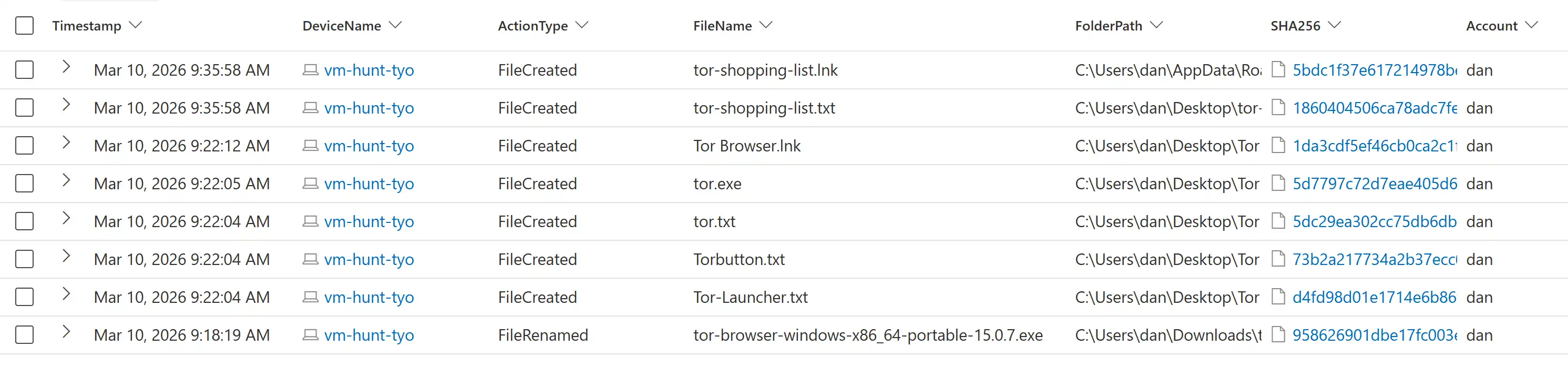
| 00:18:19 | Tor installer downloaded |
| 00:21:44 | Tor installer executed |
| 00:22:04–00:22:12 | Tor files extracted to Desktop |
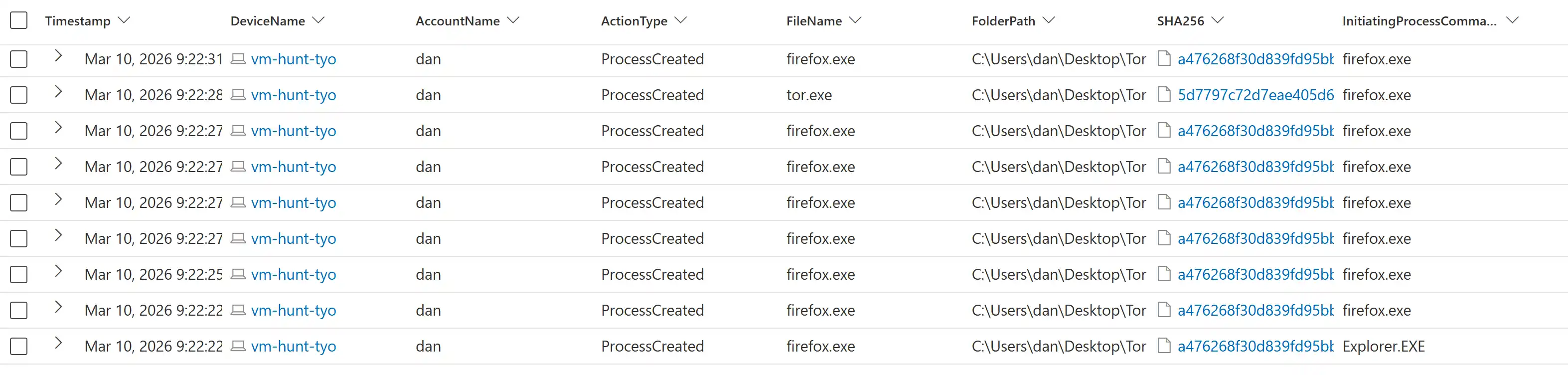
| 00:22:22 | Tor Browser launched |
| 00:22:34 | Connection established to Tor relay |
| 00:22:37–00:27:54 | Continued Tor browsing activity |
| 00:35:58 | tor-shopping-list.txt created |
This sequence shows a complete activity chain from download to network communication.
📥 Step 1: Identifying Tor Downloads
The first step was to search for any file containing the string "tor".
DeviceFileEvents
| where DeviceName == "vm-hunt-tyo"
| where InitiatingProcessAccountName == "dan"
| where FileName startswith "tor"
| order by Timestamp desc
This query identified the download of: tor-browser-windows-x86_64-portable-15.0.7.exe
This installer was downloaded to the Downloads directory, marking the start of Tor activity.
⚙️ Step 2: Detecting Installer Execution
Next, I searched process execution logs to determine whether the installer was run.
DeviceProcessEvents
| where DeviceName == "vm-hunt-tyo"
| where ProcessCommandLine contains "tor-browser"
The logs confirmed that the installer was executed and extracted the Tor Browser files to the system.

🚀 Step 3: Detecting Tor Process Activity
To confirm that Tor was actually launched, I searched for the following processes:
tor.exe | firefox.exe (Tor Browser)
DeviceProcessEvents
| where FileName has_any ("tor.exe","firefox.exe")
The logs confirmed both processes were executed shortly after extraction.
🌐 Step 4: Detecting Tor Network Connections
One of the strongest indicators of Tor activity is network communication with Tor relay nodes.
Tor commonly uses ports such as:
9001 | 9030 | 9050 | 9051 | 9150
The following query identified Tor network activity:
DeviceNetworkEvents
| where DeviceName == "vm-hunt-tyo"
| where InitiatingProcessFileName in ("tor.exe","firefox.exe")
| where RemotePort in ("9001","9030","9040","9050","9051","9150","80","443")
The endpoint established a connection to:
IP Address: 15.204.223.128 | Port: 9001 | Process: tor.exe
This confirms the system successfully connected to a Tor relay node.

📄 Step 5: Identifying User Artifacts
Later in the timeline, the following file was created on the Desktop: tor-shopping-list.txt
This file appears to be a user-created artifact generated after Tor activity was observed.
🚨 Indicators of Interest
| Type | Indicator |
|---|---|
| File | tor-browser-windows-x86_64-portable-15.0.7.exe |
| File | tor-shopping-list.txt |
| Process | tor.exe |
| Process | firefox.exe |
| IP Address | 15.204.223.128 |
| Port | 9001 |
🧬 MITRE ATT&CK Mapping
The activity observed aligns with several MITRE ATT&CK techniques:
| Technique | ID |
|---|---|
| User Execution | T1204 |
| Ingress Tool Transfer | T1105 |
| Application Layer Protocol | T1071 |
| Encrypted Channel | T1573 |
These techniques describe the download, execution, and encrypted communication behaviors observed during the investigation.
🛡 Security Assessment
The investigation confirmed that Tor Browser was downloaded, executed, and used on the endpoint, with successful outbound communication to Tor relay infrastructure.
No evidence of persistence, privilege escalation, or malware execution was observed during the analysis period.
However, the use of anonymization tools in an enterprise environment may indicate:
- Policy violations
- Reduced visibility into user activity
- Potential risk depending on user intent
The activity was therefore assessed as non-malicious but potentially policy-violating.
🔧 Recommended Security Controls
Endpoint Monitoring
Monitor for execution of Tor-related processes such as:
- tor.exe
- firefox.exe (Tor Browser)
Application Control
Restrict installation of anonymizing tools such as:
- Tor Browser
- Proxy tunneling tools
- Network Controls
Consider blocking outbound connections to common Tor ports: 9001 | 9030 | 9050 | 9051 | 9150
⬆️ Escalation Consideration
Although no direct malicious activity was identified, the use of anonymization software in an enterprise environment may violate acceptable use policies and reduce monitoring visibility.
The activity was escalated for further review to validate:
- Whether the activity was authorized
- Whether containment or remediation actions were required
🧾 Conclusion
This investigation demonstrates how endpoint telemetry can support a structured SOC workflow including alert triage, investigation, severity assessment, and escalation.
The activity followed a clear sequence:
- Tor downloaded
- Installer executed
- Browser launched
- Tor network connection established
- User artifact created
While no malicious activity was confirmed, the use of anonymization software represents a potential policy violation and highlights the importance of monitoring and contextual analysis in security operations.
📥 Download the Executive Summary Report
👉 Tor Threat Hunting Summary Report (PDF)
🔗 Full report and supporting files available on GitHub
⚠️ Disclaimer: This project is a simulated threat hunting exercise created for educational and portfolio purposes. The environment, devices, and user accounts referenced are part of a controlled lab environment and do not represent real-world systems or individuals.
Thanks for reading! 🙏
If you're interested in security governance, GRC frameworks, or enterprise risk programs - feel free to connect with me on LinkedIn.
Feel free to reach out with questions or thoughts.